0
Prototyping

XBOX Console UI

01. Overview

To test a game prototype, we should use the actual game controller hardware. We can use gamepads as triggers to move across screens or component states, or to play speech, audio, video, or Lottie. Then, use a desktop player or web browser with a connected gamepad controller to interact with the prototype.

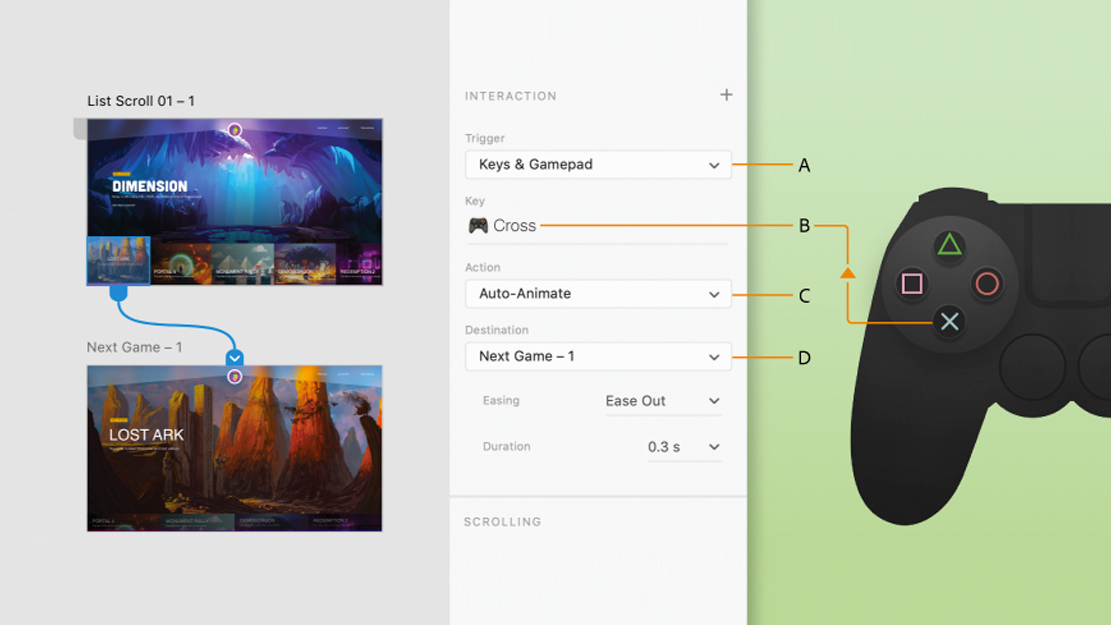
To do this, we can connect an Xbox Series X/S or One controller via Bluetooth or a PlayStation DualSense or DualShock 4 controller via Bluetooth or USB, and select Keys & Gamepad. We can assign any key on the connected gamepad as a trigger to an object, component state, or entire artboard.

Gamepad triggers : A. Select trigger to gamepad B. Gamepad shortcut key C. Action set to auto-animate D. Destination artboard or component state.

02. My test

On my test I used an XBOX then I used gamepads as triggers to move across screens and component states, (remember,you can also play speech, audio, video, or Lottie). Then, use a desktop player (you can use a web browser too) with a connected gamepad controller to interact with my prototype.

Xbox Home Screen

Thank you for taking the time to watch this sneak peek and please stay tuned cause more sexy stuff is coming soon.